Password Cipher
PW CipherPassword Cipher makes it easy to remember:
-
Strong passwords for all your sites and apps
| Site | Password |
|---|---|
| yahoo | z65ta494# |
| v0xi5y61# | |
| amazon | s8g5as99# |
| netflix | b0tk8n20# |
| paypal | g6vuwq47# |
Password Cipher is a free tool that makes it easy for you to have unique and strong passwords for each app and web site.
To create a password start by entering the name of the web site or app in the String field. Then enter common word or string into the Key field. You use the same key for all web sites and apps. Next enter the length you want the password to be into the Length field. When you click the Calculate button the bottom of the page will be filled wiith the Cipher output.
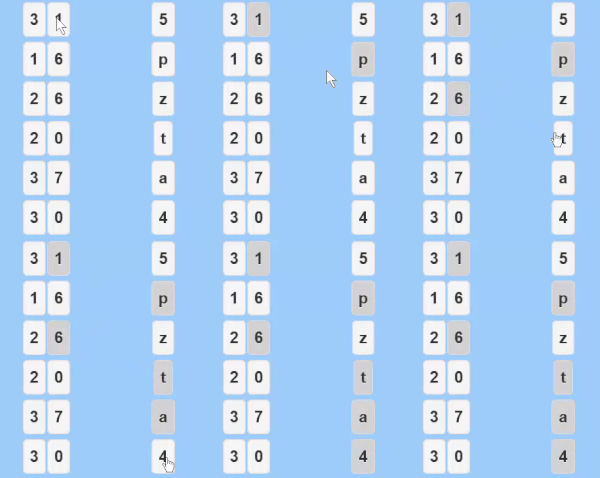
You can use the buttons in the Cipher Output and Standard Characters section to create a password in the Scratchpad text field. Each time you click on a button it will add that character to the Scratchpad field. Use the Shift button to get capital letters. Click on the buttons using a pattern that you keep constant. In this way you will build up a password that is unique to each web site and that is an relatively random series of letters and numbers. More ideas for patterns are in the Tips and Tricks section.
Copy the password out of the Scratchpad field and use it wherever you need it. On many smartphones you can copy the field by pressing and holding on it.
The input section of the page has a number of Hide/Show buttons. You can use these buttons to show or hide the field that each is next to. This can help you hide your information from people that might be looking over your shoulder. The page also has a Clear button that you can use to clear all the data out of all the fields. In case you forget to use the Clear button, there is a countdown timer that will automatically clear all the fields 2 minutes after you are finished using the page. If you want to restart the time to give yourself more time just click the Calculate or Shift buttons.
Key to successful use of Password Cipher is having a good patterns from the Cipher Output. There is a lot of variety in the patterns you can use in the Cipher Output to create good passwords. First of all, you should try to include upper and lower case letters, numbers, and special characters. You can get special characters by clicking on the buttons in the Standard Characters section. Here are a few ideas you can use.
You can also make your passwords a lot harder to decipher if you alter the string you enter. The string doesn't always have to be exactly the domain name or app name. Here are things you can use.
The Password Cipher works like a simple cipher. It is similar to what was used in World War One or what you may have used as a kid if you were kind of nerdish. Password Cipher just makes it easier for you.
Password Cipher takes the String you enter (i.e. 'abcde') and converts it to the numbers associated with each letters position in the alphabet. For example a=1 and b=2 and c=3 and so on. It then takes the key you provided (i.e. 'abcde'), converts them into numbers and adds them to the numbers from the letters to get new numbers (i.e. 1+1=2, 2+2=4, 3+3=6 and so on). The resulting list of numbers in this example would be '2,4,6,8,10'. These numbers are then converted back to letters (i.e. 2=b, 4=d, 6=f and so on). These resulting letters and numbers are output in the 'Outputs' columns of the Cipher Output section. In this example, the columns would be '2,4,6,8,10' and 'b,d,f,g,i'. If you want to see how PasswordCipher works you can go into the Settings page and choose to show the input values in the cipher output table.
Numbers are included at the end of the Password Cipher alphabet. For example z=26 and 1=27 and 0=36. There is no difference between upper case letters and lower case letters. Password Cipher does not allow for any special characters in the input string. If you request a password that is longer than the String you entered or the Key you entered then Password Cipher just repeats the String or Numbers. For example if you entered 'abc' and 'abcd' and requested a 6 character long password then Password Cipher would use the String 'abcabc' and the Numbers 'abcdabcd'. The Cypher Output would be '2,4,6,5,3,5' and 'b,d,f,e,c,e'.
The number one risk of using Password Cipher is that people looking over your shoulder could see either the passord you create or see the input Numbers and pattern that you use. The best way to reduce this risk is to make sure people aren't able to look at your screen or hands as you use the tool. The next best way is to use the checkboxes in Password Cipher to hide the data that you are entering.
The second risk of using Password Cipher is that someone might hack into several of the web sites that you use and look at the passwords that you created. In this case they might be able figure out what your Numbers and pattern are. While you can't stop people from hacking web sites, you can reduce the risk of them getting valuable information by having different Numbers and/or patterns for different classes of sites. For example, your financial web sites could use a different pattern or different Numbers than your non-financial sites.
Password Cipher makes it easy to remember:
| Site | Password |
|---|---|
| yahoo | z65ta494# |
| v0xi5y61# | |
| amazon | s8g5as99# |
| netflix | b0tk8n20# |
| paypal | g6vuwq47# |